
Streaks vs Completer: Which iPhone Habit Tracker Fits Your Routine?
Streaks is an award-winning habit tracker built around an unbroken chain of days. Here is how Completer compares on progress tracking, cost and iPhone features — and when Streaks is the better choice.

Streaks has been around for over a decade and has collected just about every honor an iPhone app can get: an Apple Design Award, Editors’ Choice, and a 4.8-star rating from around 27,000 ratings. It runs on iPhone, iPad, Apple Watch, Mac and Apple Vision Pro, and you pay for it once.
So why look for an alternative? The most common reason is the idea the app is named after. Streaks puts one number at the center of every habit — how many days in a row you’ve done it — and that number goes back to zero when you miss a scheduled day. For some people that’s exactly the push they need. For others, one bad week wipes out the sense of progress they built over months.
We make Completer, an iPhone habit tracker that shows your progress as a grid instead, so keep in mind that we’re on one side of this comparison. The details about Streaks below come from its App Store listing, release notes and the developer’s website.
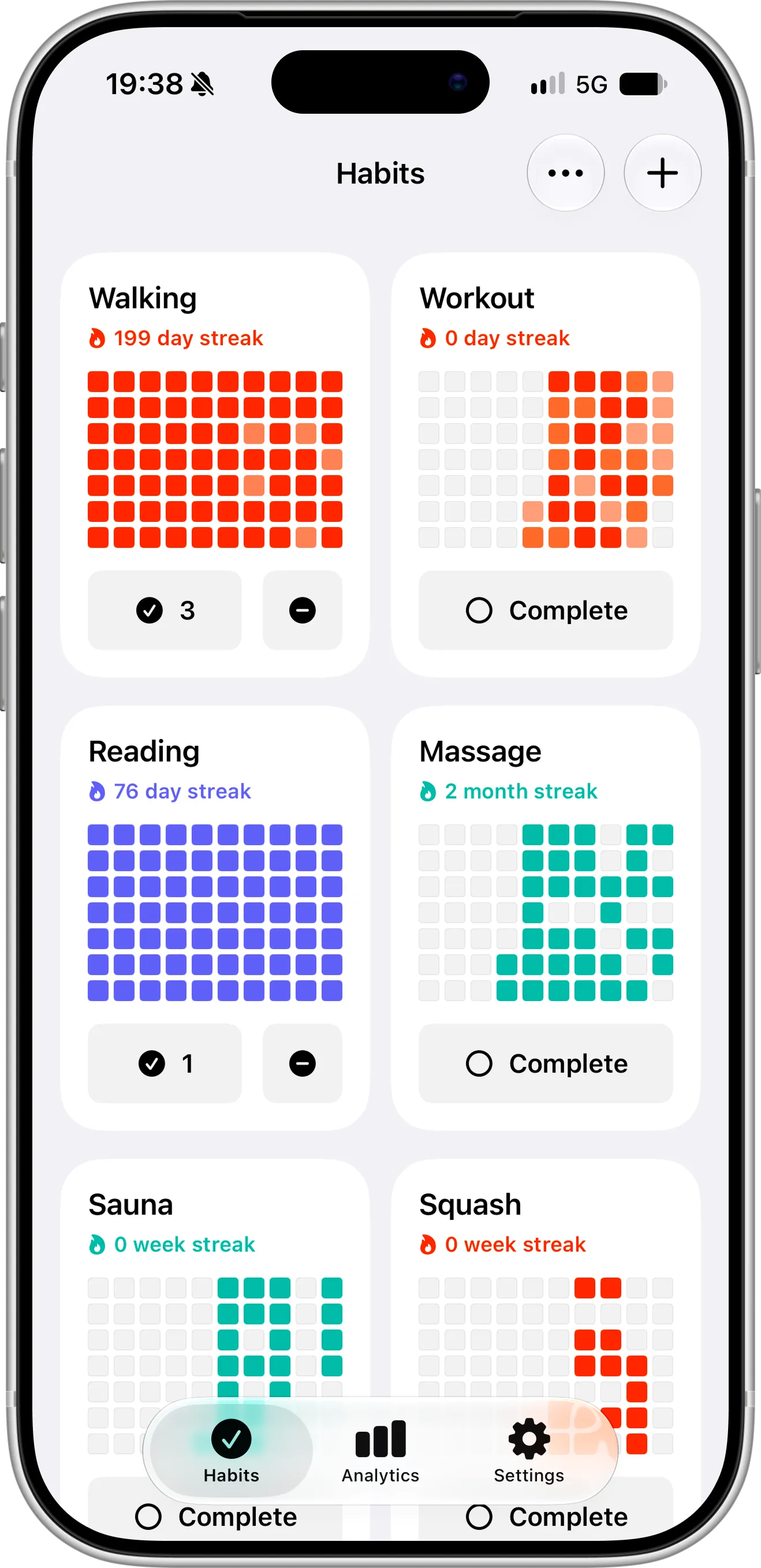
Completer’s Habits screen: a missed day is just one empty square in the grid, and the rest of your progress stays visible — even a habit whose streak has just reset still shows months of history.
Streaks and Completer Compared
Details are current as of October 2026. Both apps update regularly and prices depend on your country, so the App Store has the final word.
| Streaks | Completer | |
|---|---|---|
| Platforms | iPhone, iPad, Apple Watch, Mac, Apple Vision Pro | iPhone, iPad |
| Price (US) | $5.99 one-time | Free for up to 3 habits; Pro is $2.99/month, $19.99/year or $39.99 one-time lifetime |
| Free version or trial | No | Free version, no time limit |
| Number of habits | Up to 24 | Unlimited with Pro |
| How progress is shown | Current and best streak, task statistics | A grid of squares for each habit, shaded by how much of the day’s goal you reached, plus streaks and charts (Pro) |
| Goals | Every day, every other day, specific weekdays or days of the month, or a number of days per week or month | Daily, weekly or monthly |
| Automatic completion from Apple Health | Yes | No |
| Timed tasks | Yes | No |
| Habits you want to quit | Negative tasks | Track as a regular habit, or use our separate quit app, ReLess |
| Notes | Daily notes per task | A note on each completion |
| Home Screen widgets | Yes | Yes, free |
| Lock Screen widgets | Yes | Yes, free |
| Siri and Shortcuts | Yes | Yes |
| Action button | Yes, through Siri Shortcuts | Yes |
| Spotlight and Apple Intelligence suggestions | No | Yes |
| Sync | iCloud | iCloud, automatic, no sign-in |
| Family Sharing and shared tasks | Yes | No |
| Export and import | Not described on the listing | Yes, JSON (Pro) |
| Ads | No | No |
One Habit, 30 Days, Two Apps
The clearest way to see the difference is to follow a single habit. Say you set a goal to read 20 pages every day in November. You read for the first 17 days, miss the 18th because of a late flight, and then read every day until the end of the month.
In Streaks, your counter climbs to 17, drops to 0 on day 18, and finishes the month at 12. Your best streak is saved in the statistics, but what you see when you open the app is 12.
In Completer, the habit’s streak also starts over after the missed day, but the main thing you see is the grid: 29 colored squares and a single empty one in the middle of the month.
Both apps record the same facts — they just put a different one in front of you. If seeing “12” after a great month would make you want to quit, the grid is probably the better fit. If the threat of losing the counter is what gets you reading on a tired evening, Streaks is designed for exactly that.
What It Costs Over Time
Streaks is one of the few habit apps that still sells for a single, low price, and it’s the cheapest option here if you need more than a few habits. Here’s how the totals compare in the US:
| After 1 year | After 2 years | After 3 years | |
|---|---|---|---|
| Streaks | $5.99 | $5.99 | $5.99 |
| Completer Free (up to 3 habits) | $0 | $0 | $0 |
| Completer Pro, yearly | $19.99 | $39.98 | $59.97 |
| Completer Pro, Lifetime | $39.99 | $39.99 | $39.99 |
The difference is when you pay. With Streaks, you pay before you’ve added a single habit, since there’s no free version or trial. With Completer, you can track up to three habits for free for as long as you like — with streaks, reminders, widgets and iCloud sync — and decide about Pro later, or never.
Where Completer Does Things Differently
Squares that show how much you did
Not every habit is a single check-in. If your goal is to walk three times a day or drink eight glasses of water, Completer fills each day’s square gradually. Hit the full goal and the square gets its full color; do two out of three and it’s a bit lighter; do one and it’s lighter still.
You can see this in the screenshot at the top of this article: most of the squares in the Walking and Workout grids are bright, with a few paler ones mixed in. So you can tell the days you did everything from the days you only did part of it, and a partial day still counts as progress instead of a blank square.
Goals that aren’t daily
Both apps let you set habits that don’t happen every day — Streaks has a particularly flexible set of schedules, from every other day to specific days of the month. The difference is how progress looks. In Completer, the grid adapts to the goal: for a habit like “3 times a week”, every square stands for a week; for “twice a month”, every square is a month. A habit you only plan to do monthly never looks like a page of missed days.
A note on every completion
Streaks lets you keep a daily note on a task. In Completer, a note belongs to a specific completion — the distance you ran, the chapter you finished, the movie you watched — so a habit’s history reads like a small journal.
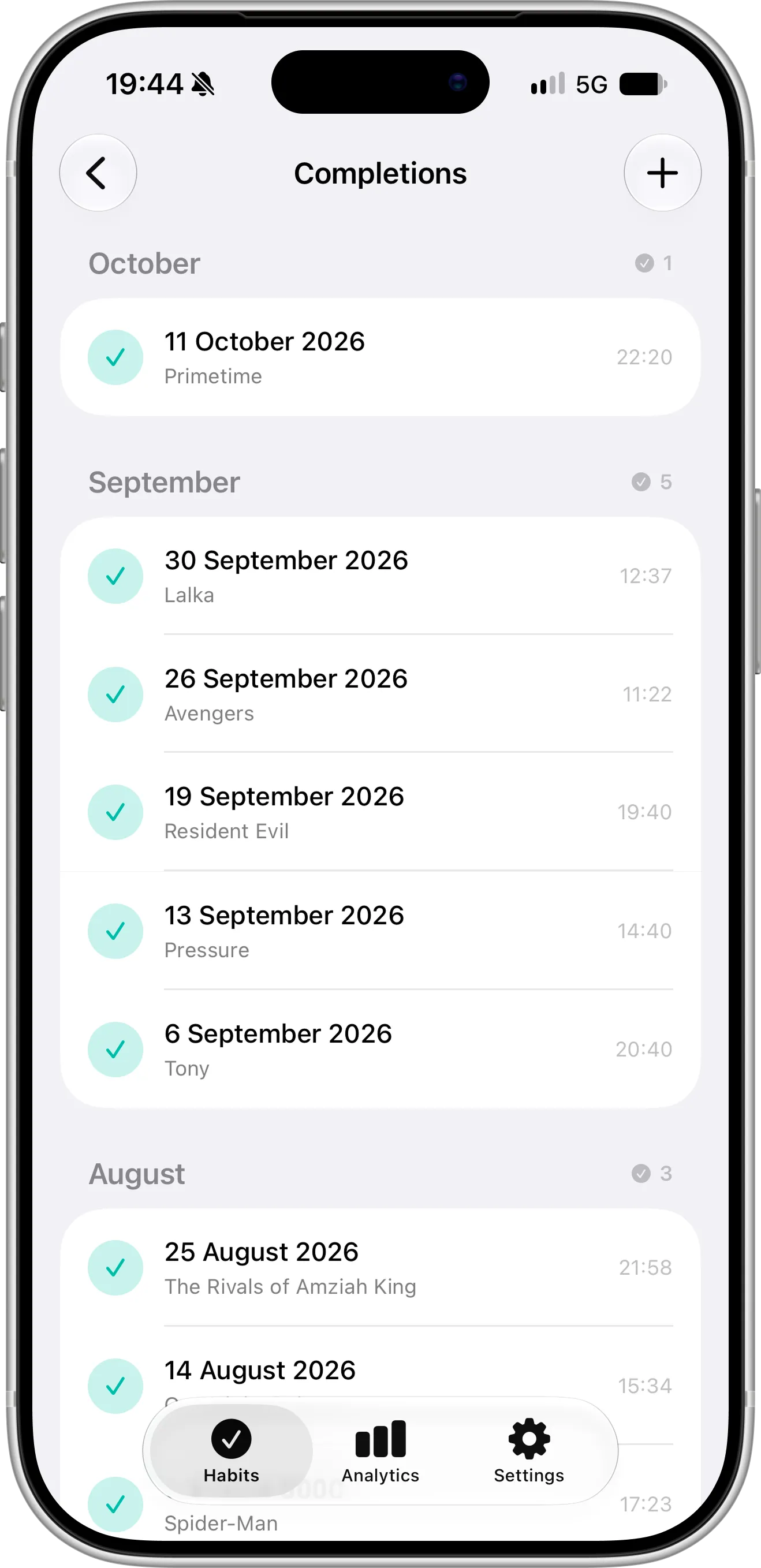
Every completion in Completer can have its own note — here, the movie watched on each trip to the cinema — so looking back through a habit’s history reads like a small journal, grouped by month.
More places on your iPhone
Both apps offer Home Screen and Lock Screen widgets and work with Siri and Shortcuts, and in both you can pick which habit a widget shows — so a Lock Screen widget can keep your most important habit in view all day.
Thanks to Siri Shortcuts, you can put a habit on the Action button in either app. Completer goes a step further: your habits show up in Spotlight search, and because Completer tells iOS each time you finish a habit, Siri and Apple Intelligence learn when you usually do it and can suggest completing it at that time, without opening the app.
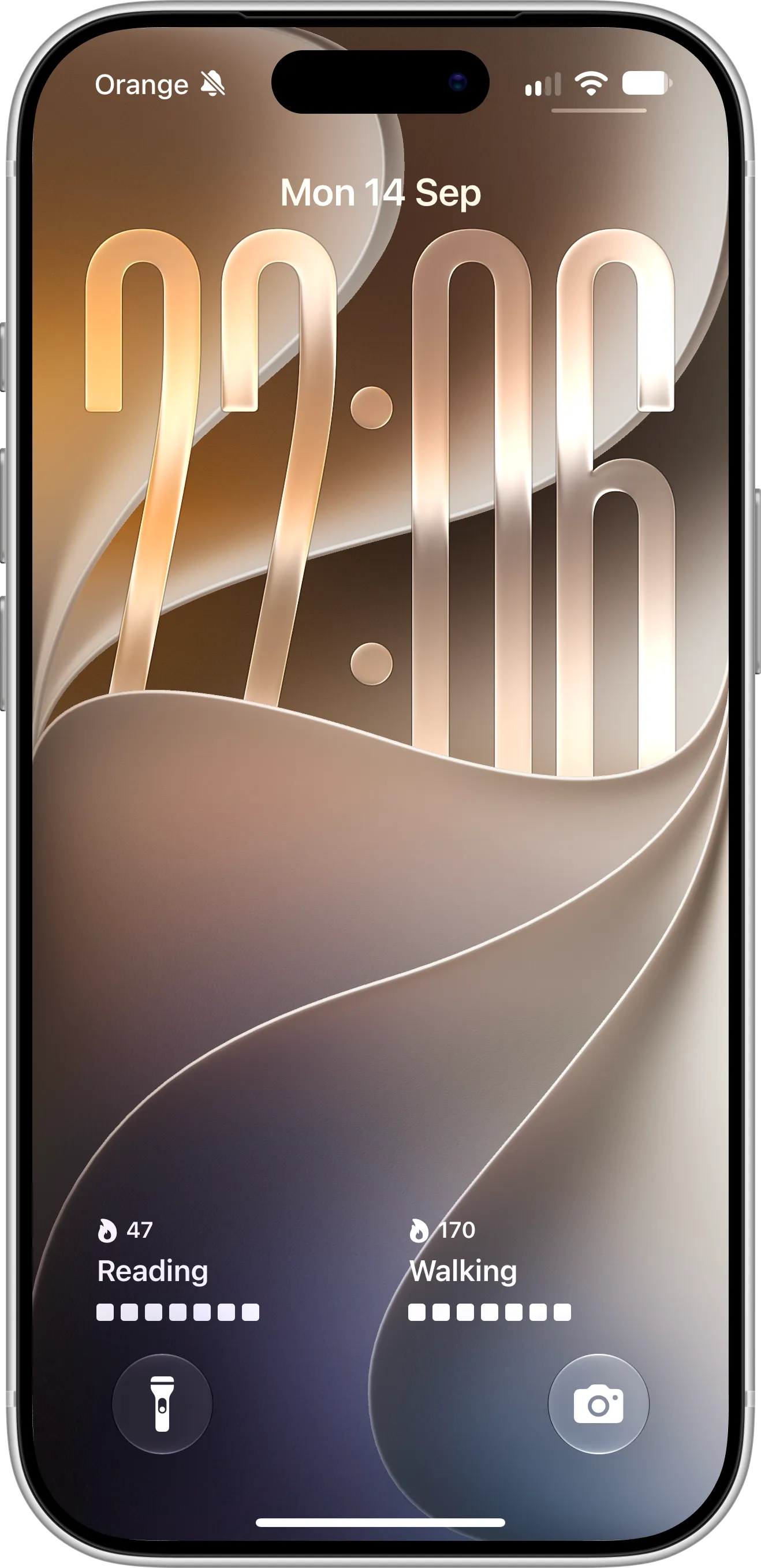
Completer Lock Screen widgets for Reading and Walking, each with its current streak and the last seven days, so your most important habits stay in view every time you pick up your phone, without opening the app.
Your history in a file
With Completer Pro, you can export all your habits and completions as a JSON file and import them again later. Your data syncs through your own iCloud account, and there’s no Completer account to create.
Where Streaks Is the Better Choice
Streaks has strengths Completer doesn’t try to match. It’s likely the better app for you if:
- You wear an Apple Watch. Streaks has a well-regarded watch app with complications and notifications. Completer has no watch app.
- You want habits to complete themselves. Streaks reads Apple Health data and can mark a task done when you reach your steps, finish a workout, log water or take a medication. In Completer, you log habits yourself.
- You use a Mac or Vision Pro. Streaks has apps for both; Completer runs on iPhone and iPad.
- You need a timer. Timed tasks, such as 10 minutes of meditation, are built in and can even set off an alarm.
- You’re tracking for the whole family. Family Sharing covers up to six people with one purchase, and you can share tasks with other Streaks users.
- You like making an app your own. 78 color themes and over 600 task icons give you far more ways to style Streaks than Completer offers.
Trying Completer Next to Streaks
Completer can’t import Streaks data, but you don’t need to switch overnight. A simple way to test it:
- Install Completer and add up to three habits you care about most — that’s all free.
- Log the days you’ve already done by long-pressing the Complete button, or add a whole date range at once.
- Add a Home Screen widget for the habit you’re focusing on.
- Track in both apps for two or three weeks, then keep the one you actually open.
If you’re setting up habit tracking for the first time, our 7-step guide to tracking habits on iOS goes through it in more detail.
FAQ
Is Streaks a one-time purchase?
Yes. Streaks costs $5.99 in the US and has no subscription. There’s no free version or trial, so you pay before using it.
Is there a free alternative to Streaks?
Completer is free for up to three habits, with no ads and no time limit. Streak tracking, reminders, Home Screen and Lock Screen widgets, and iCloud sync are all included. Pro adds unlimited habits and advanced charts.
Does Completer reset my progress if I miss a day?
Your current streak starts over, just like in Streaks. But the missed day only shows up as one empty square in the habit’s grid, and all your other completed days stay visible. Forgot to log rather than missed the habit? You can add past completions at any time.
Can Completer track steps or workouts automatically?
No. Completer doesn’t connect to Apple Health and has no Apple Watch app yet. If that’s important to you, Streaks is the better option.
What’s a good way to stay motivated after a missed day?
Treat it as one data point, not a failure — most lasting habits have gaps. We collected a few practical ideas in 7 proven ways to stay consistent with your habits.
Final Thoughts
Streaks is a polished app at a fair price, and if you live in the Apple Watch and Apple Health ecosystem, it’s hard to beat. If you’d rather see months of progress than a single number that can drop to zero, Completer is worth a try — and the free version is enough to find out.