Productive vs Completer: Which iPhone Habit Tracker Is Worth Paying For?
Productive is one of the most downloaded habit trackers, but its subscription keeps getting pricier. An honest look at how Completer compares on pricing, privacy and widgets — and where Productive wins.

With a 4.6-star rating from more than 90,000 ratings, Productive is one of the most popular habit apps on the App Store. It groups your habits into morning, afternoon and evening, and wraps them in guided programs, challenges and articles. So why do so many people go looking for something else? Usually it comes down to money: the subscription isn’t cheap, the upgrade offers keep coming, and there is no way to simply pay once.
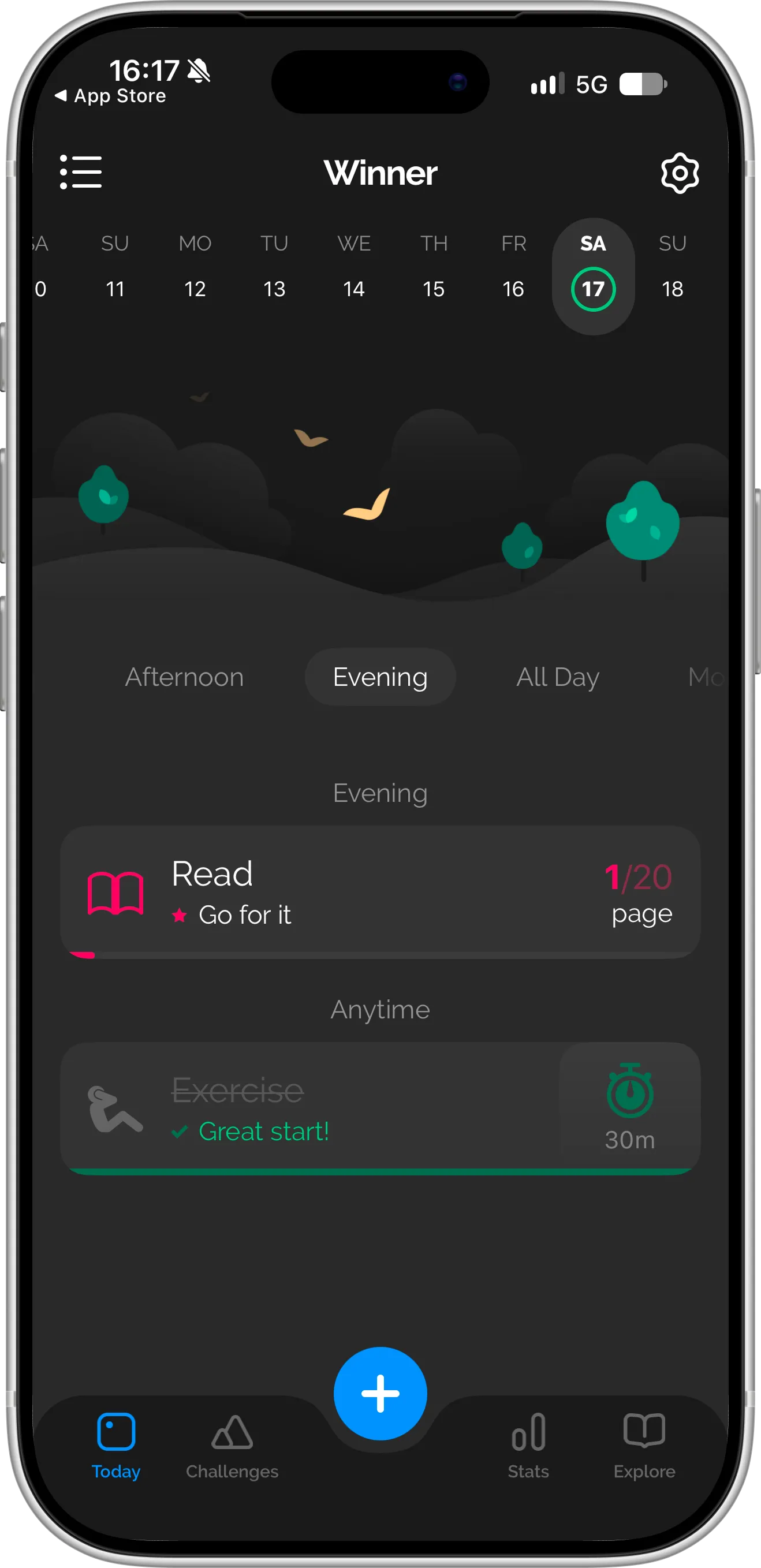
Productive’s Today screen groups your habits by time of day — here the Evening section is open, with a page goal for reading and a timed exercise habit below it. Screenshot taken in October 2026.
That’s the question this article tries to answer: is Productive Premium worth it, or is a simpler, cheaper app enough? Full disclosure — we are the team behind Completer, an iPhone habit tracker built around simple progress grids, so we have a stake in the answer. We’ll keep it factual and point out where Productive does a better job.
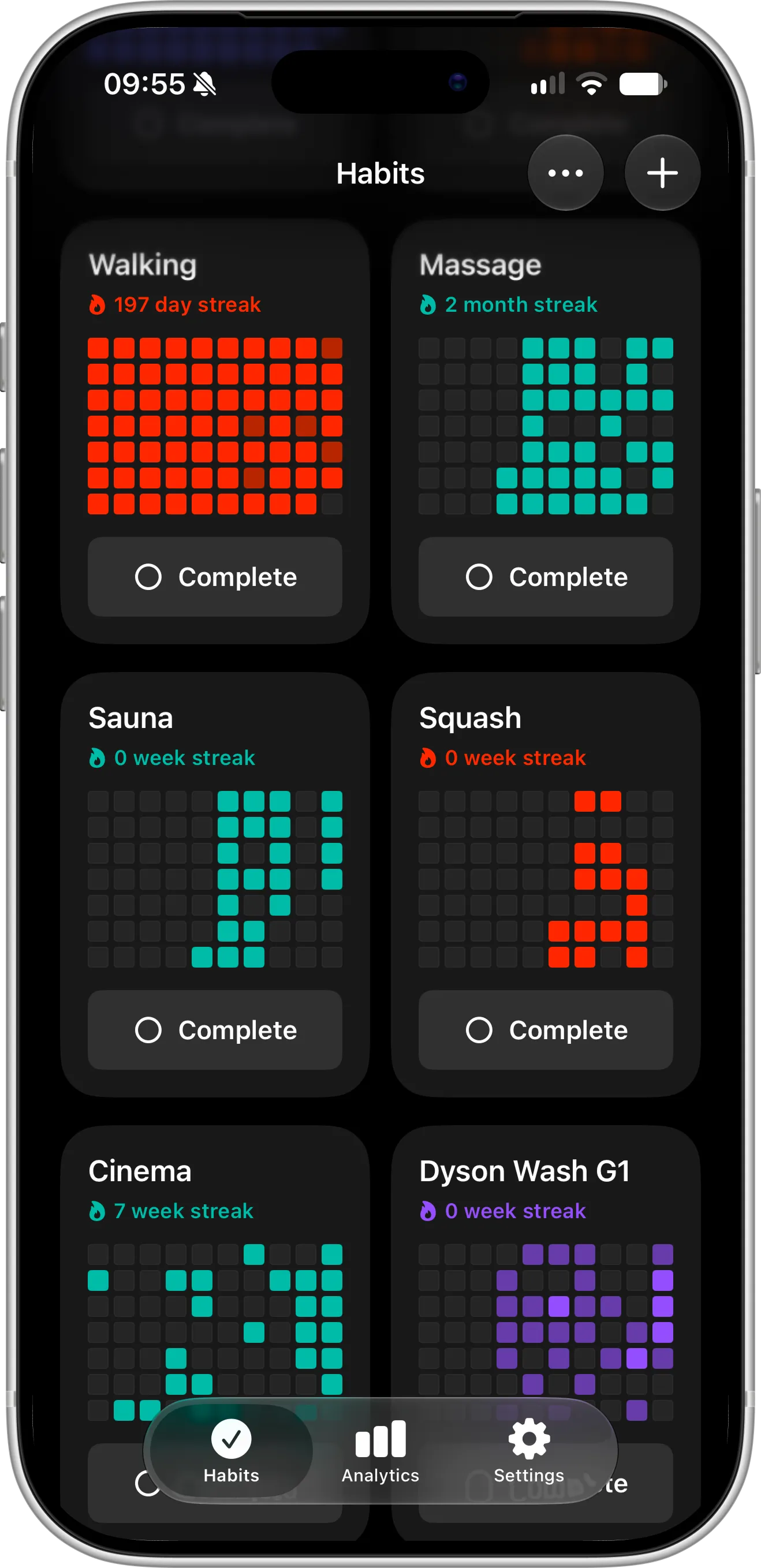
Completer’s Habits screen: no time-of-day sections, just one progress grid per habit with its streak, and a single tap on Complete to log today. Weekly and monthly habits get a square per week or month.
Feature and Price Comparison
The details below come from the App Store listings of both apps in October 2026. Subscription prices differ between countries and change from time to time, so treat them as a snapshot.
| Productive | Completer | |
|---|---|---|
| Platforms | iPhone, iPad, Apple Watch, Android | iPhone, iPad |
| Free to download | Yes | Yes |
| Free version | Up to 5 habits | Up to 3 habits |
| Pro pricing (US) | $5.99/week or $19.99–$79.99/year | $2.99/month, $19.99/year or $39.99 one-time lifetime |
| One-time lifetime purchase | No | Yes |
| Daily, weekly and monthly goals | Yes | Yes |
| Guided programs, challenges and articles | Yes | No |
| Reminders | Per habit (at a set time, after an action or at a location), plus a daily reminder with your plan for the day | Per habit, or one general reminder — both on the days and at the time you choose |
| Progress visualization | Streaks, perfect days and a calendar | One simple progress grid per habit, with a square for each day |
| Sync between devices | Requires signing in to a Productive web account | Automatic via iCloud, no sign-in |
| Notes on each completion | No | Yes |
| Import and export | No | Yes (Pro) |
| Home Screen and Lock Screen widgets | Yes, showing today’s habits or your habit list | Yes, free — each widget can show a habit of your choice with its streak and progress |
| Shortcuts | Yes | Yes |
| Spotlight and Apple Intelligence | No | Yes |
5 Reasons People Switch From Productive to Completer
1. You can pay once and be done
Productive only sells subscriptions, and what you’re offered isn’t always the same. The App Store lists yearly plans anywhere from $19.99 to $79.99, and the offer you get depends on which paywall you happen to see. When we tried the app, it gave us just two choices — $5.99 a week or a yearly subscription — with no monthly plan in between. Keep the weekly plan for a full year and it adds up to more than $300. App Store reviewers also often mention their yearly renewal getting more expensive.
Completer keeps it to three options in the US: $2.99 a month, $19.99 a year, or $39.99 once for Lifetime. Pick Lifetime and Pro is yours for good — nothing to renew, nothing to cancel, no surprise on next year’s bill. If three habits are enough for you, you don’t need to pay at all: the free version includes streaks, reminders and widgets, with no trial clock running.
2. One simple grid instead of several views
This is the biggest visual difference between the two apps. Productive shows your progress across several views: streaks, “perfect days” when you complete everything, and a calendar of past days. It’s thorough, but to see how a habit is really going, you put the picture together yourself.
Completer keeps it to one thing: every habit gets its own progress grid — rows of small squares, one for each day, that fill in with color as you complete the habit. No separate screens to compare — one look at the grid shows months of consistency, and a single missed day is just one empty square, not a broken chain.
The grid also adapts to your goal. For a habit like “3 times a week” or “twice a month”, each square represents a week or a month, so a weekly habit never looks like a string of missed days.
Completer also lets you add a note to every completion — how far you ran, which chapter you finished, how a session felt — so you can look back at the details behind each square. Productive doesn’t support notes on individual check-ins.
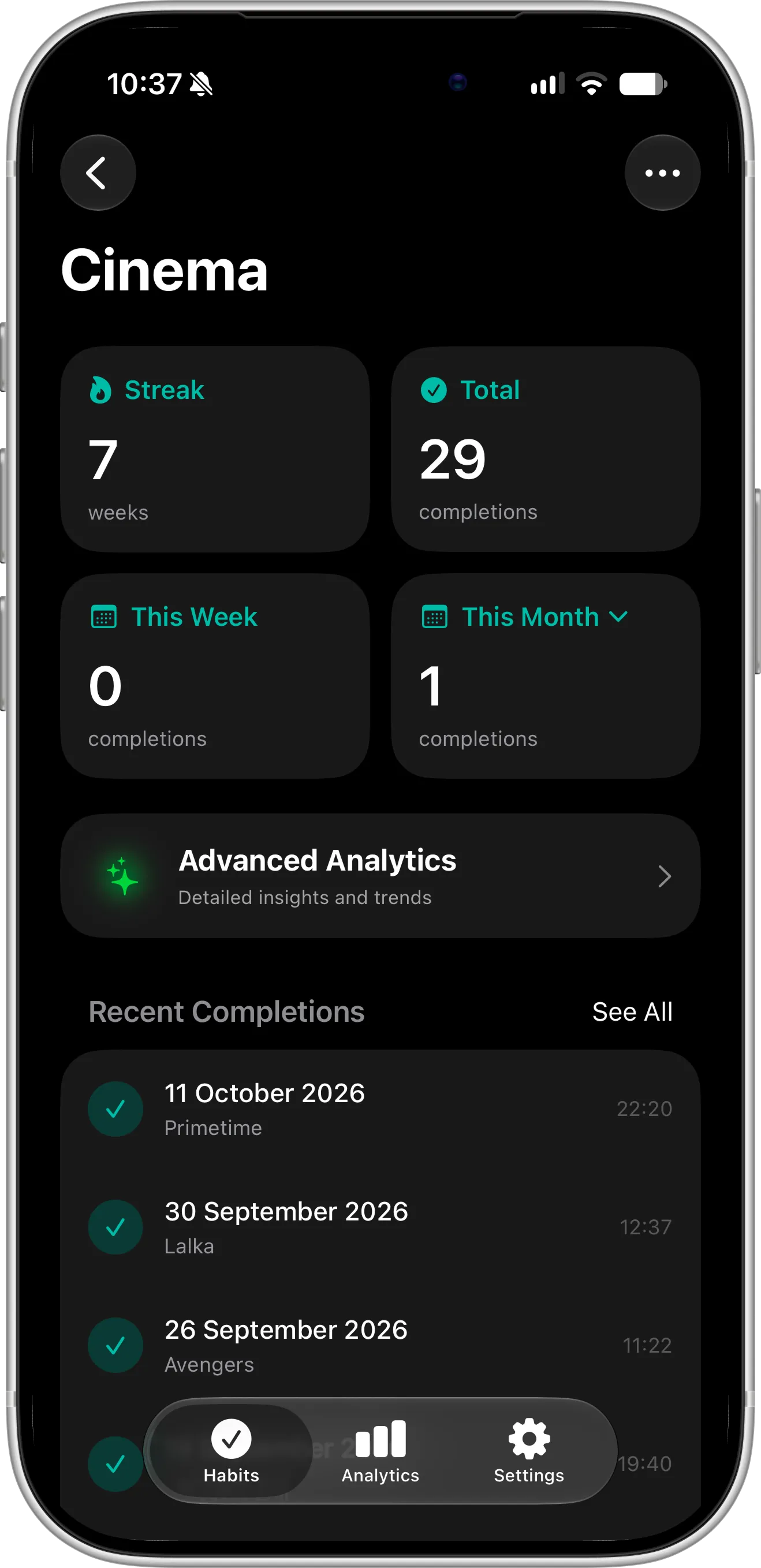
A Cinema habit in Completer: a 7-week streak, total completions and this month’s count at the top, and below them every completion with its own note naming the movie that was watched that day.
3. Fewer interruptions
Reviewers frequently describe Productive’s upgrade prompts as overwhelming, with “limited-time offers” appearing while they are just trying to check off a habit. In Completer, you only see the Pro screen when you tap something that actually needs Pro, such as adding a fourth habit or opening advanced analytics. The rest of the time, logging a habit is one tap.
4. Your habit data stays with you
Productive’s App Store privacy labels list purchases, contact info and identifiers as data that may be used to track you, and location, contact info and usage data as linked to your identity.
Productive works without signing in, but if you want your habits synced between devices, you need to sign in to a Productive web account. There’s also no option to export your habits, so your history stays inside the app.
Completer keeps your habits in your own iCloud account and syncs them between your iPhone and iPad automatically. There’s no separate Completer account, so there’s no email to enter and no password to remember. And with Completer Pro, you can export all your habits and completions at any time — and import them back.
5. Your habits everywhere on your iPhone
Completer is written specifically for iOS, so it plugs into the parts of the iPhone you already use. Both apps offer Home Screen and Lock Screen widgets, but they work differently. Productive’s widgets show an overview — today’s habits or your habit list. In Completer, you choose which habit each widget shows, so the one you’re working on hardest can sit on your Lock Screen with its own progress, visible every time you glance at your phone. Completer’s widgets are free for everyone.
You can also tell Siri you’ve finished a habit, assign one to the Action button, or jump to it from Spotlight.
Both apps work with the Shortcuts app, so you can build automations around your habits in either one. Completer goes a step further. Your habits show up in Spotlight search, and every time you complete one, Completer lets your iPhone know. Over time, Siri and Apple Intelligence learn your routine — for example, that you usually log your morning run around 7 a.m. — and can suggest completing that habit right when you tend to do it, without opening the app or setting up a shortcut first.
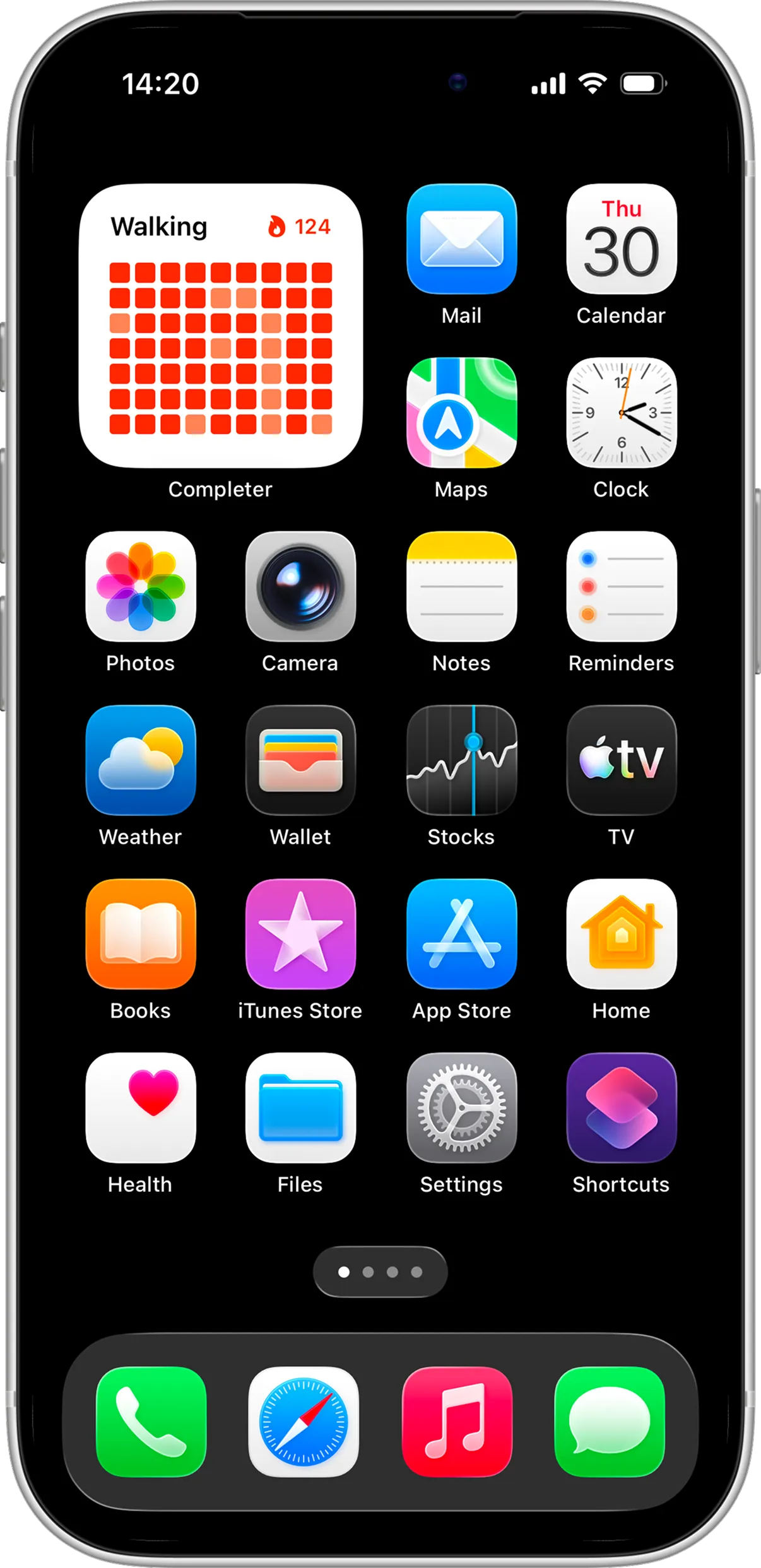
A Completer Home Screen widget showing the habit you choose — here Walking, with its 124-day streak and progress grid — right next to your apps, so it’s the first thing you see when you unlock.
When Productive Is the Right Pick
Completer isn’t for everyone. You’ll probably be happier staying with Productive if:
- You’re not only on iPhone. Productive runs on Android and has an Apple Watch app; Completer is available for iPhone and iPad only.
- You like being coached. Productive comes with goal-based programs, guided challenges and articles about productivity and motivation. Completer doesn’t tell you what to do — it just tracks what you decide to do.
- Your day is built in blocks. If you think of your routine as morning, afternoon and evening, Productive’s time-of-day sections fit that naturally.
- You want reminders triggered by places or routines. Each Productive habit can remind you at a set time, after another action, or when you arrive at or leave a location, and a separate daily reminder walks you through your plan for the day. Completer reminders are time-based: set one for a specific habit, or a single general reminder that covers all your habits, on the days and at the time you pick.
- You only need a few habits for free. Productive’s free version lets you track up to five habits; Completer’s free version covers three.
- You’re motivated by others. Productive’s challenges put you up against users from around the world. Completer has no social features — your habits stay yours.
The Verdict: Is Productive Premium Worth It?
If you use the programs, challenges and Apple Watch app every week, Productive Premium can be worth the subscription — especially if you need Android too.
If you mostly open the app to check off habits, you’re likely paying for features you don’t use. In that case Completer gives you unlimited habits, progress grids, detailed charts, free widgets and iCloud sync — and lets you buy it once with Lifetime.
Not sure? Completer’s free version needs no account and no trial, so you can run it next to Productive for a couple of weeks and see which one becomes part of your routine.
Moving Your Habits Over
Completer can’t import Productive data, but setting things up again is quick:
- Download Completer and add your habits, choosing a daily, weekly or monthly goal for each.
- Fill in your recent history — long-press the Complete button to log past days, or add a whole date range at once — so your streaks carry over.
- Put a Home Screen widget or a Lock Screen widget where you’ll see it every day.
- Turn on reminders for the habits that tend to slip — or set one general reminder for the days and time that suit you, so you don’t have to configure every habit.
New to tracking habits on iPhone? Our 7-step guide to tracking habits on iOS walks through the setup in more detail.
FAQ
Is there a cheaper alternative to Productive?
Yes. Completer is free for up to three habits — with streaks, reminders and both Home Screen and Lock Screen widgets — and has no ads. Completer Pro unlocks unlimited habits and advanced analytics for $2.99 a month, $19.99 a year, or a single $39.99 Lifetime payment in the US. iCloud sync is free for everyone.
Does Productive have a lifetime purchase?
No. When we tried Productive, the app offered only weekly ($5.99 in the US) and yearly subscriptions. With Completer you can choose Lifetime and pay only once — or go monthly or yearly if you prefer.
Do I need an account to use Completer?
No. There’s nothing to sign up for. Completer uses your iCloud account to sync habits between iPhone and iPad in the background.
Does Completer have challenges or guided programs like Productive?
No — Completer focuses purely on tracking. For ideas on building routines that last, read our article on 7 proven ways to stay consistent with your habits.
Is Completer available on Android or Apple Watch?
Not at the moment. Completer is made for iPhone and iPad, so if Android or Apple Watch support is a must, Productive is the better fit.
Can I transfer my Productive history to Completer?
There’s no automatic transfer, and Productive doesn’t offer a way to export your habits. Add your habits in Completer and use backfill to log past completions — it usually takes just a few minutes.
Bottom Line
Productive packs a lot into one app, and for people who use its programs and challenges, the subscription can make sense. If all you really want is to track your habits and see your progress clearly — without a growing yearly bill or constant upgrade offers — Completer does that well, and you can start for free.