Looking for a HabitKit Alternative? An Honest Comparison With Completer
HabitKit is one of the best-loved habit trackers on iPhone. Here is an honest look at how Completer compares — where it does more, where HabitKit is still the better pick, and which one fits your routine.

HabitKit is one of the most popular habit trackers on the App Store, and for good reason: it is clean, private and built around a satisfying year-long tile grid that fills up as you complete your habits. If you are reading this, though, something about it probably doesn’t fit you anymore — maybe you want your habits on more than one device, on your Lock Screen, or you simply want to see what else is out there.
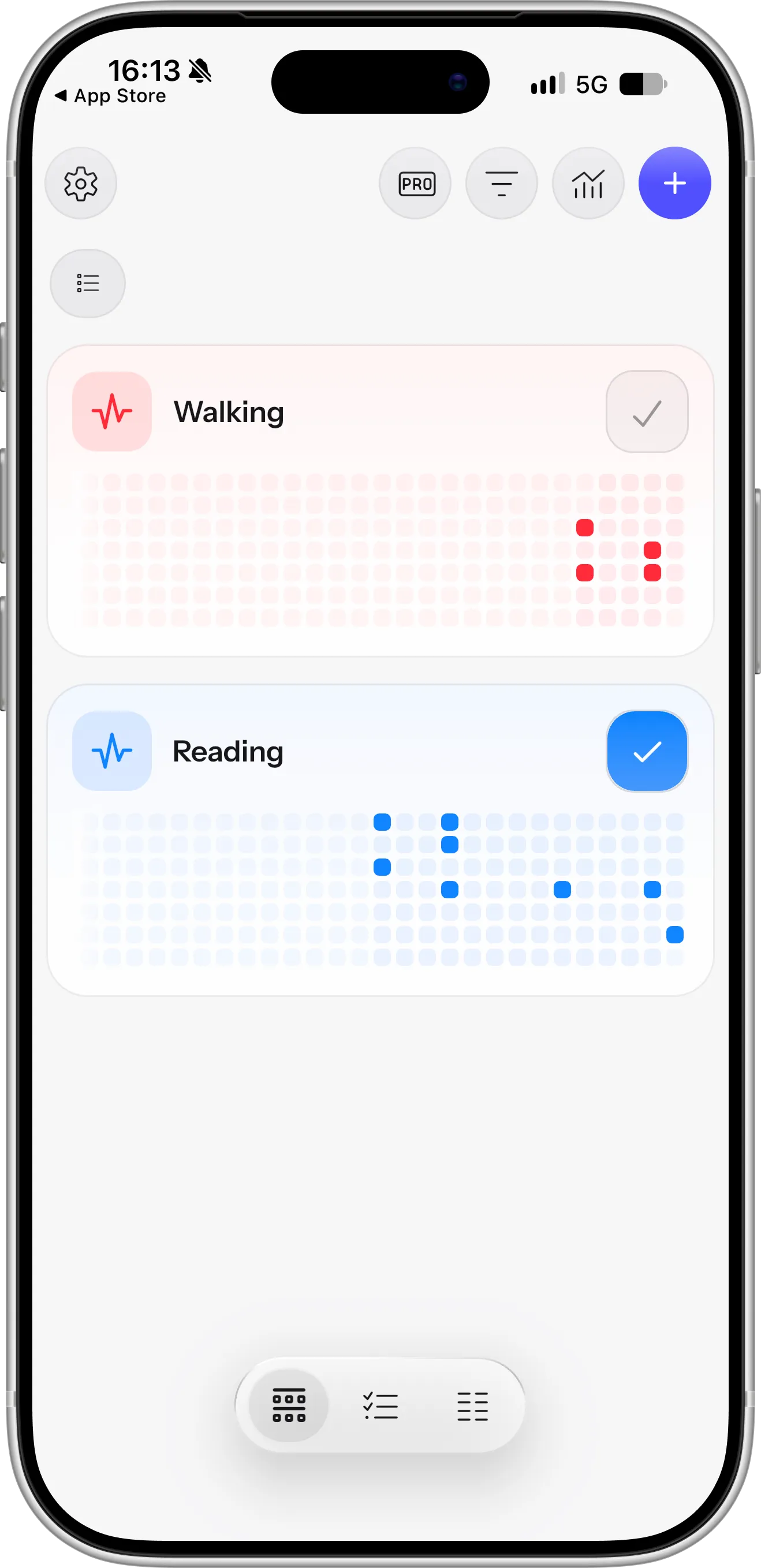
HabitKit’s main screen: every habit gets its own tile grid, with one square per day that fills in as you complete it, so you can see at a glance how consistent you’ve been. Screenshot taken in October 2026.
Completer is a habit tracker for iPhone built around the same idea of visual, contribution-style progress. We make Completer, so we are obviously not neutral — but we will try to be fair. Below is a side-by-side comparison, including the cases where HabitKit is still the better choice.
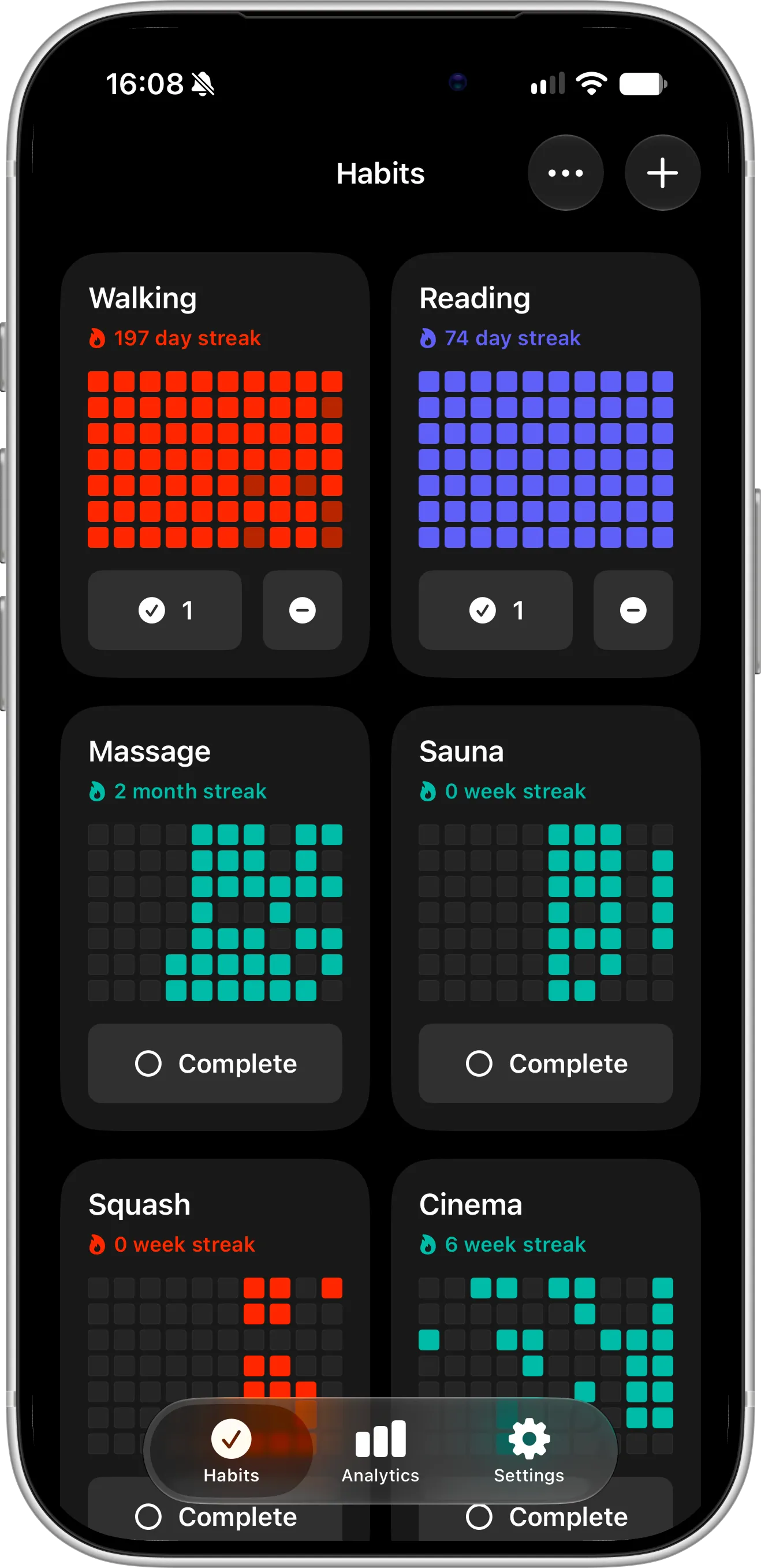
Completer’s main screen: every habit gets its own contribution grid and streak, counted in days, weeks or months depending on its goal, so a weekly or monthly habit never looks like a row of missed days.
HabitKit vs Completer at a Glance
Information below is based on each app’s App Store listing and release notes as of October 2026. Both apps update often, so check the App Store for the latest details.
| HabitKit | Completer | |
|---|---|---|
| Platforms | iPhone, Android | iPhone, iPad |
| Built with | Flutter (cross-platform) | Native iOS app |
| Free to download | Yes | Yes |
| Free version | Up to 4 habits | Up to 3 habits |
| Pro pricing (US) | Monthly, yearly or lifetime; lifetime listed at $14.99–$29.99 | $2.99/month, $19.99/year or $39.99 lifetime |
| Tile / contribution grid | Yes | Yes |
| Daily, weekly and monthly goals | Yes | Yes |
| Quit (bad) habits | Yes, dedicated quit mode with daily limits | Track as a regular habit (e.g. “No sugar”), or use our dedicated quit app, ReLess |
| Home Screen widgets | Yes (Pro) | Yes (free) |
| Lock Screen widgets | No | Yes (free) |
| Sync between devices | No | Yes, automatic via iCloud (all users) |
| Apple integrations | Shortcuts | Siri, Shortcuts, Action button, Spotlight |
| Advanced analytics charts | Yes (Pro) | Weekday, monthly, yearly and per-habit charts (Pro) |
| Import and export | Yes (Pro) | Yes, JSON (Pro) |
| Archive habits | Yes | Yes |
| Account required | No | No |
| Ads | No | No |
Where Completer Goes Further
Built natively for iPhone
HabitKit is built with Flutter, a cross-platform framework that lets one codebase run on both iPhone and Android — which is exactly why it’s available on both. Completer is a native iOS app, built only for Apple devices with Apple’s own frameworks.
In everyday use, that means Completer looks and behaves like the rest of your iPhone: system fonts, gestures, animations and dark mode work the way iOS does. It also means deep system features — Lock Screen widgets, Siri, the Action button and Spotlight — are first-class parts of the app, and new iOS releases are supported quickly. Completer was fully adapted for iOS 27 shortly after its release.
Your habits on the Lock Screen
Completer supports both Home Screen and Lock Screen widgets, and both are free for all users. Seeing your habits every time you pick up your phone — without unlocking it — is one of the simplest ways to stay consistent. HabitKit offers Home Screen widgets only, and they require HabitKit Pro.
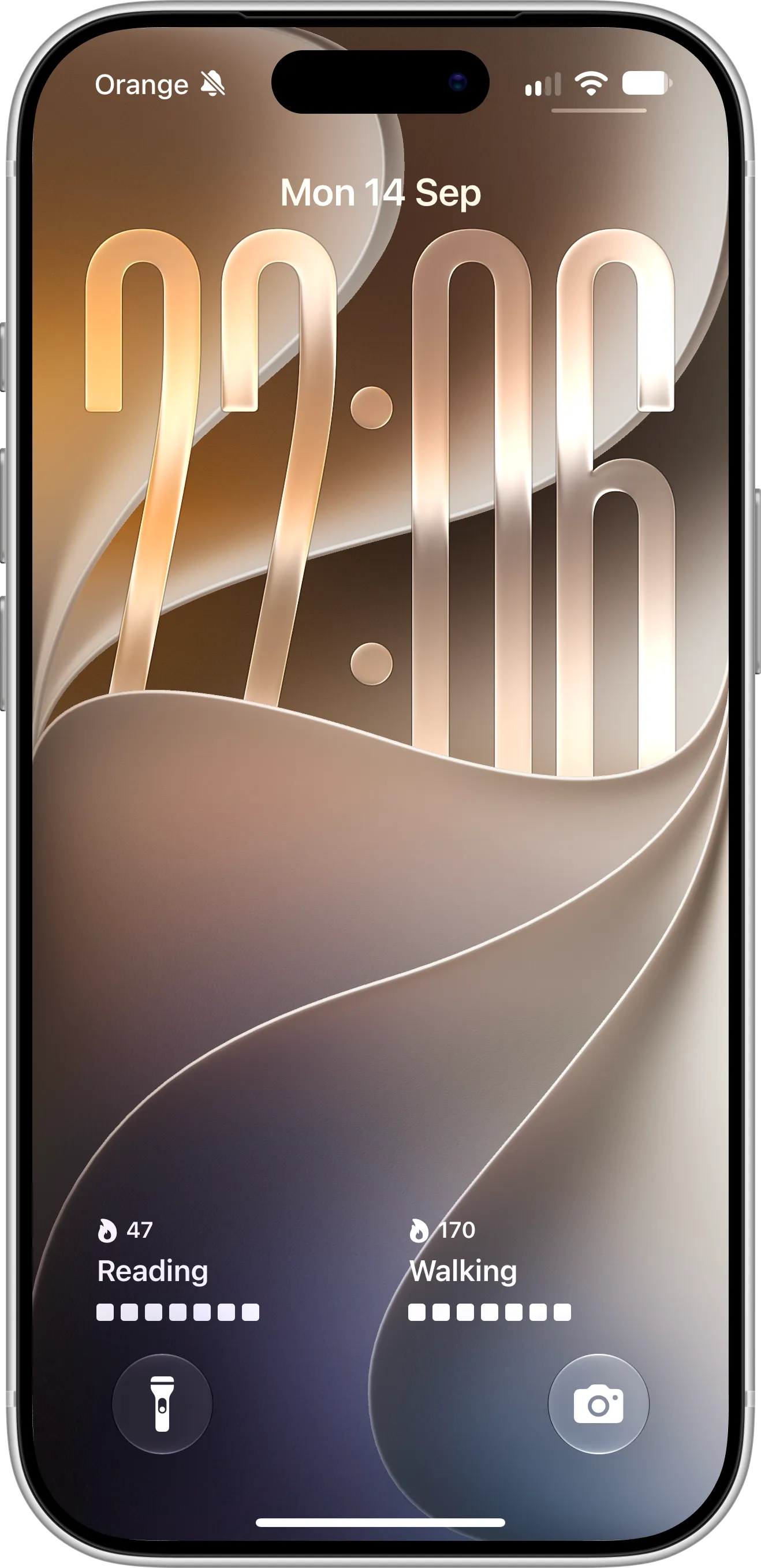
Two Completer Lock Screen widgets, each showing one habit with its current streak and the last seven days, so you can check your progress without unlocking your iPhone. Widgets are free for all users.
Sync across iPhone and iPad with iCloud
HabitKit keeps your habits on a single device and doesn’t sync between devices. Completer syncs your habits automatically across your iPhone and iPad through your own iCloud account and backs them up, with no separate account to create. Sync is included for all users, not just Pro.
Siri, Shortcuts, Spotlight and the Action button
Both apps support Shortcuts. Completer also lets you log a completion just by asking Siri, map a habit to the iPhone Action button, and find any habit from Spotlight search. If you prefer tracking habits without opening an app at all, this makes a real difference over a month.
Deeper analytics
Completer’s analytics go beyond streaks and totals: charts break down completions by weekday, month and year, show your top habits, and compare completions per habit. It is useful when you want to understand why a habit slips — for example, noticing that you consistently miss workouts on Thursdays.
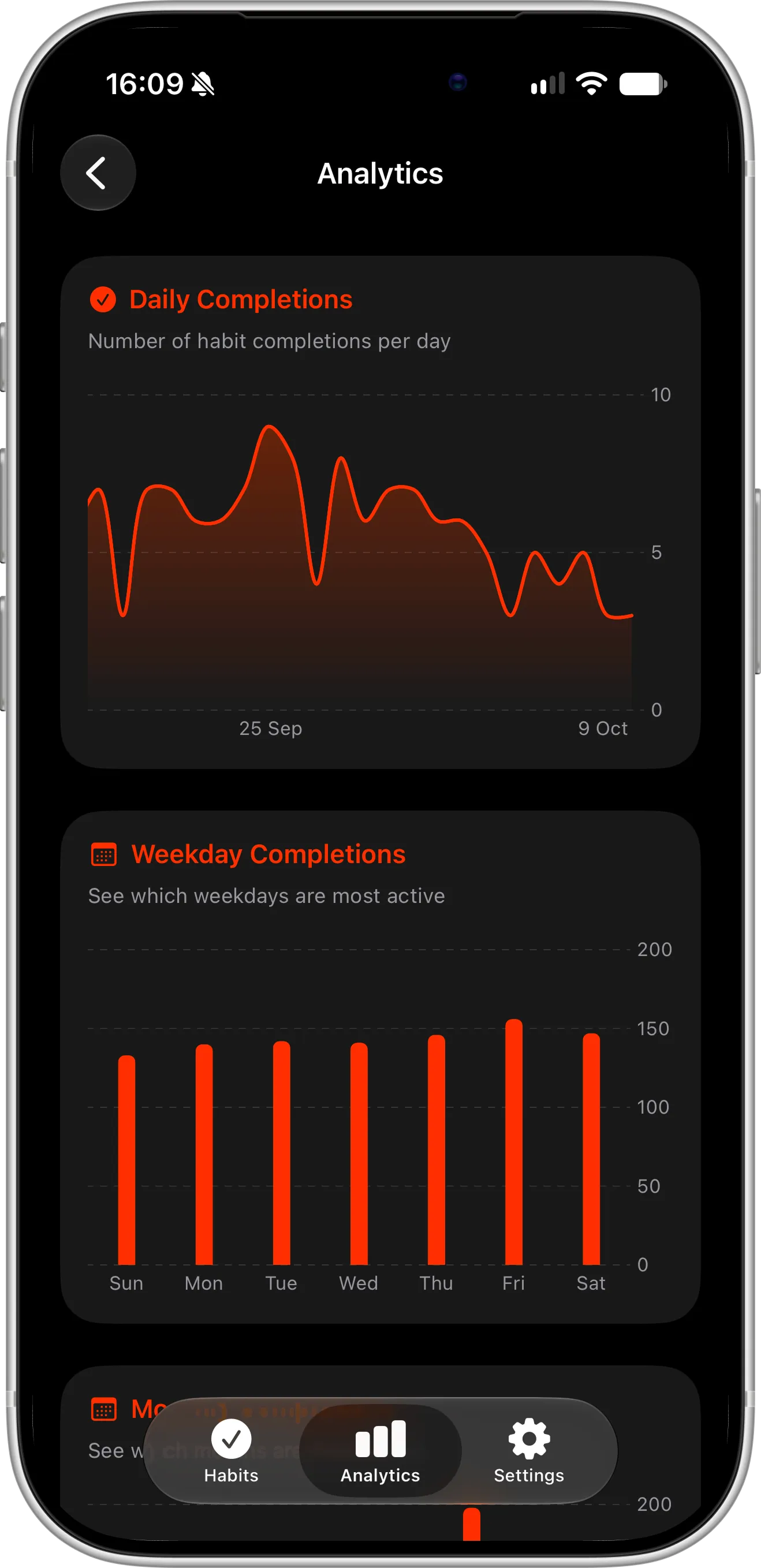
Completer Pro analytics: a chart of daily completions over time and a breakdown by weekday make it easy to spot when your habits tend to slip and which days of the week you’re most consistent.
Where HabitKit Is Still the Better Choice
An honest comparison has to include this part. HabitKit may suit you better if:
- You use Android. HabitKit is available on both iPhone and Android. Completer is iPhone and iPad only.
- You track amounts, not just check-ins. HabitKit explicitly supports count and measured habits with custom units (for example, liters of water or pages read). In Completer, you can add any amount or unit — like “2 L” or “30 pages” — to a completion’s notes, but it is saved as text rather than tracked as a measured value.
- You want a dedicated way to quit bad habits. HabitKit has an explicit quit mode with daily limits. In Completer, you can track quitting as a regular habit — like “No sugar” — and complete it each day you stick to it, but there is no special quit mode. For quitting specifically, we built a separate app, ReLess, with a timer since your last slip, streaks and milestones, money saved and support for riding out urges.
- You want a slightly bigger free version. HabitKit’s free tier covers up to four habits with streaks, statistics, notes and reminders. Completer’s free version covers up to three habits.
- Price is your main concern. HabitKit Pro generally costs less: its lifetime unlock is listed at $14.99–$29.99 on the US App Store, while Completer Pro Lifetime is $39.99. Prices vary by region, so compare both on the App Store.
- You love customization. HabitKit offers hundreds of icons, categories and several grid styles to choose from.
Which Habit Tracker Should You Choose?
Stay with HabitKit if you’re happy with it on a single phone, you need Android, or you mainly track quantities like water, steps or pages.
Try Completer if you want a truly native iPhone app with your habits on your Lock Screen, synced between iPhone and iPad, loggable with Siri or the Action button, and backed by more detailed analytics.
Because both apps are free to download, the easiest way to decide is to try Completer for a week alongside HabitKit and keep the one you actually open.
How to Switch From HabitKit to Completer
There is no direct importer between the two apps, but moving over takes only a few minutes:
- Install Completer from the App Store.
- Recreate your habits and set a daily, weekly or monthly goal for each one.
- Long-press the Complete button to backfill recent days, or add completions across a date range, so you don’t lose your current streaks.
- Add a Home Screen widget and a Lock Screen widget to keep your habits visible.
- Set reminders for the days and times that fit your routine.
For a full walkthrough, see our guide on 7 steps to track and improve your habits on iPhone.
FAQ
Is there a free alternative to HabitKit?
Yes. Completer is free to download on the App Store, lets you track up to three habits with streaks, reminders, and Home Screen and Lock Screen widgets, and never shows ads. An optional Pro upgrade — $2.99 per month, $19.99 per year or a one-time $39.99 Lifetime purchase in the US — unlocks unlimited habits and advanced analytics. Automatic iCloud sync is included for everyone.
Does HabitKit sync between devices?
No. HabitKit stores your data on a single device and doesn’t sync between devices. Completer syncs habits automatically between iPhone and iPad via iCloud, for all users, including the free version.
Does HabitKit have Lock Screen widgets?
No. HabitKit offers Home Screen widgets as part of HabitKit Pro, but no Lock Screen widgets. Completer supports both Home Screen and Lock Screen widgets, free for all users.
Can I track quitting a bad habit in Completer?
Yes, but there is no dedicated quit mode. Create a habit such as “No smoking” or “No social media before noon” and mark it complete each day you stick to it — your streak and contribution graph then show how many days in a row you’ve stayed on track. If you want a dedicated tool for breaking habits like smoking, alcohol or social media, try ReLess, our separate quit app with a time-since-last-slip timer, savings tracking and urge support.
Does Completer have a contribution grid like HabitKit?
Yes. Each habit has a contribution-style graph that fills progressively as you move toward your daily goal. For weekly and monthly habits, each square represents a week or a month.
Is Completer available on Android?
No. Completer is built specifically for iPhone and iPad. If you need Android, HabitKit is a good choice.
Can I import my HabitKit data into Completer?
Not directly. You can recreate your habits and backfill past completions in a few minutes.
Conclusion
HabitKit is a great habit tracker, and if it works for you there is no reason to switch. But if you want your habits on the Lock Screen, synced across devices, controlled by Siri and analysed in more depth, Completer is a strong HabitKit alternative for iPhone — and it is free to try.