
Grit vs Completer: Do You Really Need an All-in-One iPhone Habit Tracker?
Grit packs timers, Apple Health sync, achievements, app blocking and an Apple Watch app into one tracker. Here is how the simpler Completer compares on pricing, simplicity and tracking — and when Grit is better.

Grit: Daily Habit Tracker has grown into one of the most feature-packed habit apps on the App Store. With a 4.8-star rating from around 16,000 ratings, it runs on iPhone, iPad, Mac, Apple Watch and Apple Vision Pro, and every few weeks an update adds something new: built-in timers, Apple Health sync, achievements, habit groups, sharing habits with friends, full-screen alarms, a weekly recap — and, most recently, blocking selected apps until you’ve done a habit. It looks good, too: Grit has been carefully adapted to iOS 27 and feels at home on a modern iPhone.
That’s a lot of app. And it’s often the reason people start looking for an alternative: they wanted to check off a few habits a day and ended up with a tool that does far more than they need — with a Premium price to match.
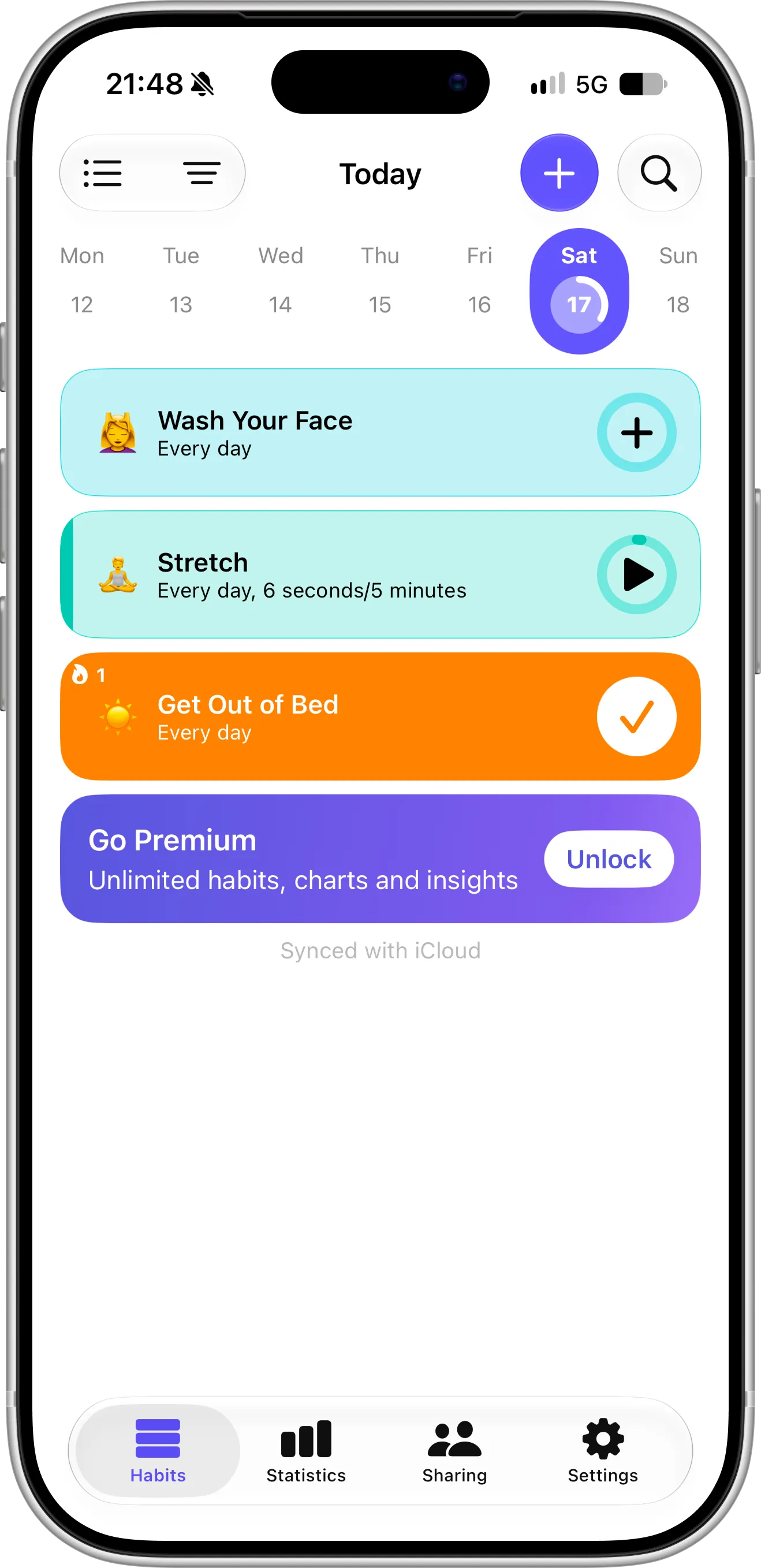
Grit’s Today screen: a week strip at the top and one colored card per habit — tap to count, start a timer or check it off. In the free version, a banner offers Premium for unlimited habits, charts and insights. Screenshot taken in October 2026.
We’re the team behind Completer, a habit tracker for iPhone and iPad that does one thing: shows your progress on each habit as a simple grid of squares. That means we’re not neutral, but we’ll stick to facts and say clearly where Grit is the stronger app.
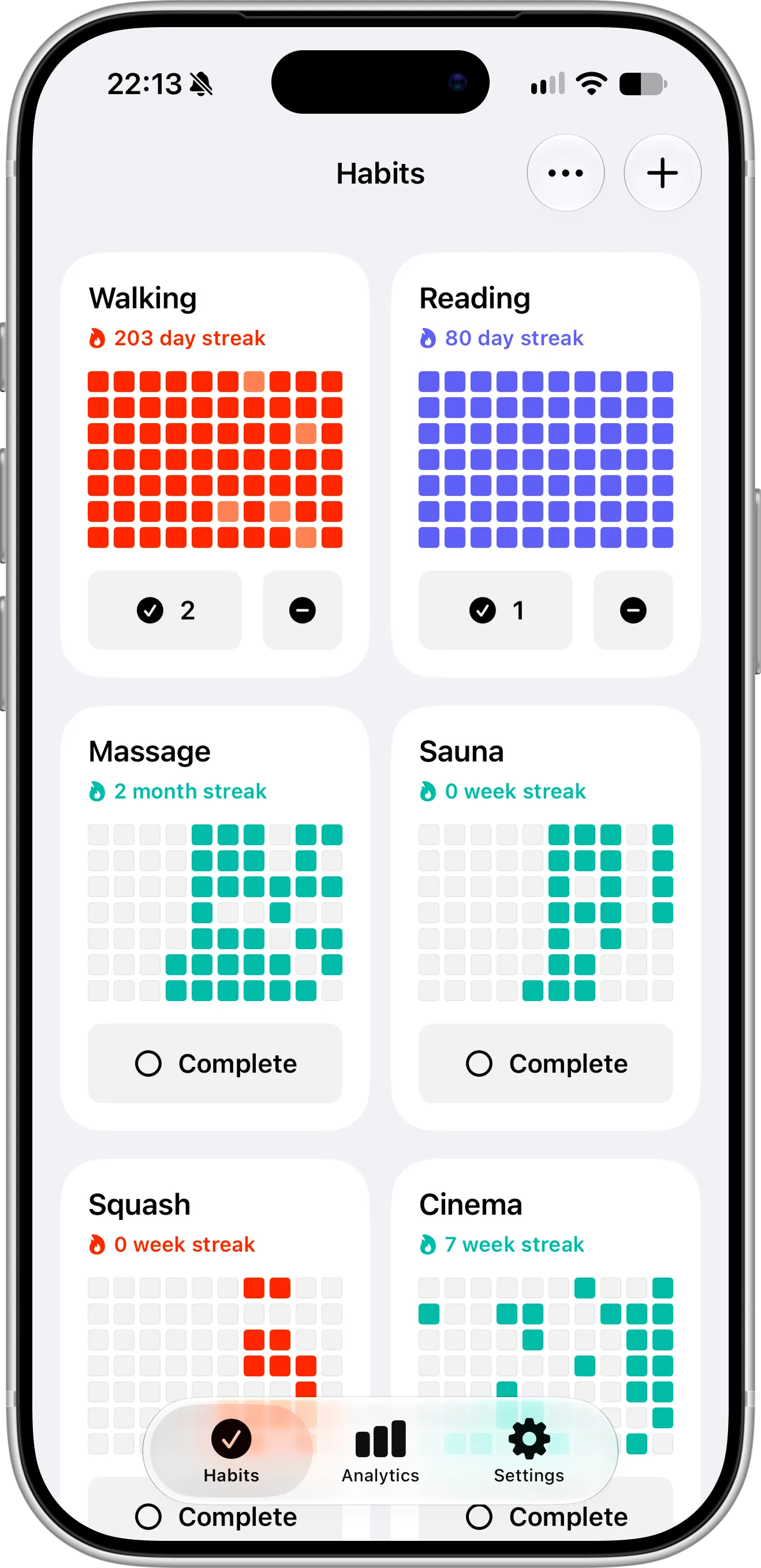
Completer’s Habits screen: one progress grid and streak per habit, from a 203-day Walking streak to a monthly Massage habit. One tap on Complete logs today, and habits with several check-ins a day show today’s count. There are no timers, badges or groups to set up — just your habits and how consistent you’ve been.
Grit and Completer Side by Side
Details below come from both apps’ App Store listings and release notes as of October 2026. Grit in particular updates often, and prices vary by country, so check the App Store for the latest.
| Grit | Completer | |
|---|---|---|
| Platforms | iPhone, iPad, Mac, Apple Watch, Apple Vision Pro | iPhone, iPad |
| Free to download | Yes | Yes |
| Free version | Up to 3 habits; detailed statistics need Premium | Up to 3 habits, with streaks, reminders, widgets and iCloud sync |
| Premium pricing (US) | $2.99/month, $29.99/year or $44.99 one-time lifetime | $2.99/month, $19.99/year or $39.99 one-time lifetime |
| Habit types | Yes/no, count and duration | Check-ins with a daily, weekly or monthly goal; amounts can go in a completion’s note |
| Built-in timer | Yes, with interval alerts | No |
| Apple Health | Syncs progress and can complete habits automatically | No |
| Achievements and badges | Yes | No |
| Habit groups | Yes | No |
| Sharing habits with friends | Yes | No |
| Blocking apps until a habit is done | Yes | No |
| How progress is shown | Streaks, statistics and progress charts | A grid of squares per habit, shaded by how much of the goal you reached, plus streaks and charts (Pro) |
| Notes on each completion | — | Yes |
| Home Screen widgets | Yes | Yes, free |
| Lock Screen widgets | Yes, without the habit’s name | Yes, free, with the habit’s name, streak and last 7 days |
| Siri and Shortcuts | Yes | Yes |
| Sync | iCloud, automatic, no sign-in | iCloud, automatic, no sign-in |
| Export | JSON | JSON (Pro) |
| Import a backup | No | Yes (Pro) |
Why People Switch From Grit to Completer
1. Pro costs less
When we opened Grit’s paywall, it offered three Premium plans in the US: $2.99 a month, $29.99 a year or $44.99 once for Lifetime. Its App Store page also lists other price points, from $1.99 to $9.99 a month, so the offer you see may differ. Price is one of the most common complaints in Grit’s App Store reviews.
Completer Pro costs the same per month — $2.99 — but $19.99 a year instead of $29.99, and $39.99 instead of $44.99 for Lifetime. Over three years on yearly plans, that’s $59.97 for Completer against $89.97 for Grit. And if three habits are enough for you, you don’t need to pay at all — the free version keeps working for as long as you use it, with no trial to cancel.
2. A free version that shows your progress
Both apps let you track up to three habits for free. The difference is what you get to see. In Grit, the detailed statistics screens are part of Premium. In Completer, every free habit has its full progress grid and streak, plus reminders, Home Screen and Lock Screen widgets and iCloud sync. Pro adds unlimited habits and advanced charts, but you can see how a habit is going without paying anything.
3. Fewer upgrade prompts
Grit promotes its offers and subscriptions often, and on many different screens — starting with a Premium banner right on the main habit list. If you’re on the free version, or have already decided not to upgrade, that gets tiring quickly.
In Completer, you only see the Pro screen when you tap something that actually needs Pro, such as adding a fourth habit or opening advanced analytics. The rest of the time, logging a habit is just one tap.
4. Less to set up, less to manage
It starts before you add your first habit. Grit opens with a long onboarding — screen after screen of questions and setup — which is a lot to get through when all you want is to track a couple of simple habits. In Completer, you can add your first habit right away.
Grit’s flexibility comes with choices. Creating a habit can mean picking a type, a unit, a goal, a schedule, a group, a timer, reminders and an Apple Health link. Then there are achievements, a weekly recap, a daily progress score and app blocking on top. If you use all of that, it’s great. If you don’t, it’s noise between you and the habit.
In Completer, a habit is just a name, a color and a goal — daily, weekly or monthly. Logging it is one tap. When your goal is more than once a day, like walking three times or drinking eight glasses of water, each day’s square fills in gradually, so a partial day still shows up as progress.
For goals that aren’t daily, Completer’s grid adapts: for “3 times a week”, every square stands for a week; for “twice a month”, every square is a month. A weekly habit never looks like a string of missed days.
5. An export you can restore
Both apps can export your data as a JSON file, but they’re made for different jobs. Grit’s export isn’t a backup: there’s no way to import the file back into Grit, so it’s useful for looking at your data elsewhere, not for restoring your habits.
With Completer Pro, the export is a full backup of your habits and completions, and you can import it back at any time — to restore your history, move it to a new device or start over without losing years of progress.
6. The story behind each square
Every completion in Completer can carry its own note — how far you ran, which book you finished, how a session felt. Over a few months, a habit’s history turns into a small journal you can scroll through by month.
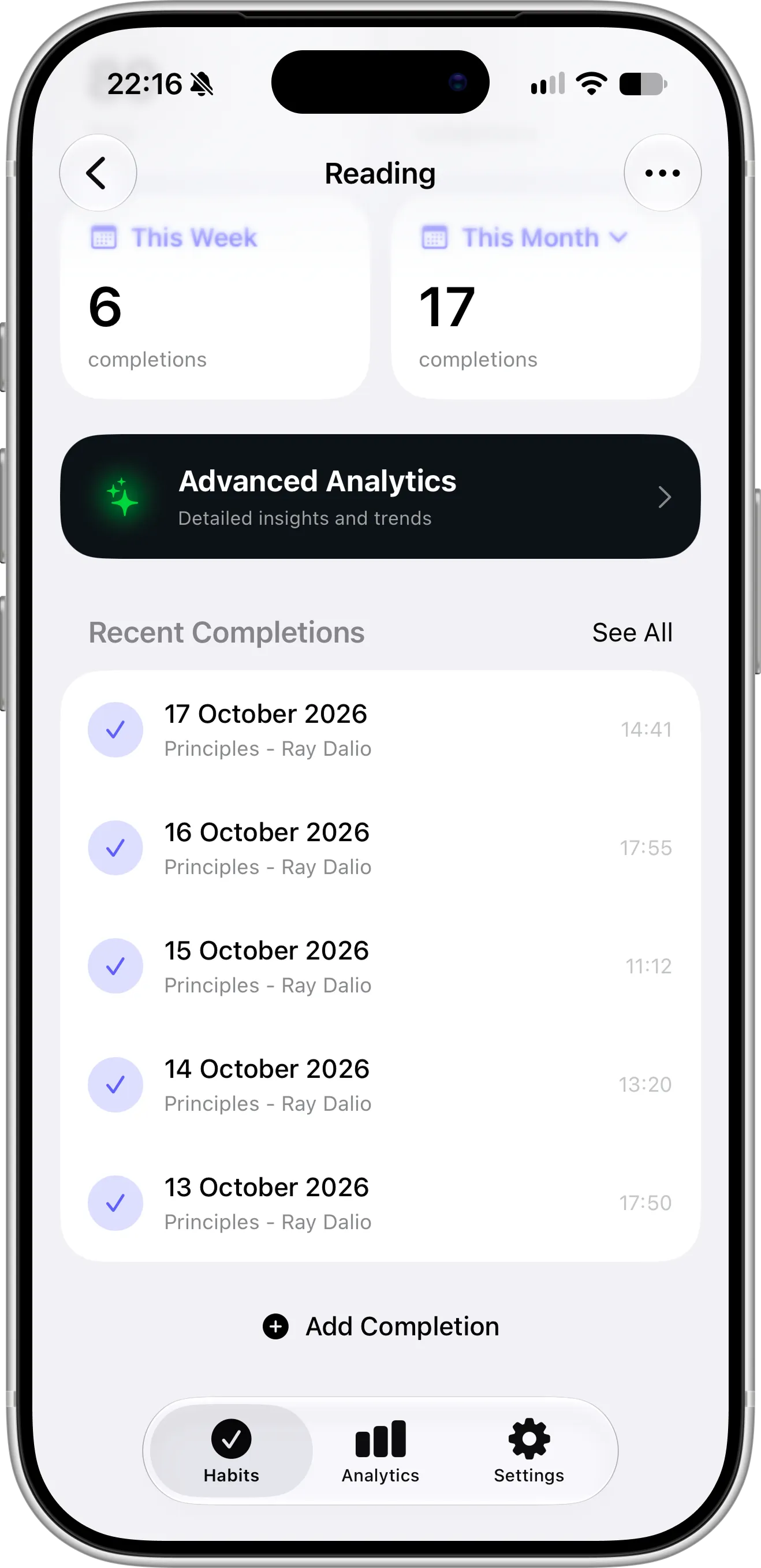
A Reading habit in Completer: 6 completions this week and 17 this month, and every recent completion has its date, time and a note naming the book — here, Principles by Ray Dalio. Looking back shows what you actually did, not just that you did it.
7. Lock Screen widgets you can read at a glance
Both apps have Lock Screen widgets, but Grit’s don’t show the name of the habit, so with more than one on your Lock Screen it’s hard to tell which is which. Each Completer widget shows the habit you pick by name, with its streak and the last seven days. Put the habit you’re working hardest on on your Lock Screen, and you’ll know exactly how it’s going every time you pick up your phone. Completer’s widgets are free for everyone.
You can also log a habit by asking Siri, assign one to the Action button, or find it in Spotlight. And because Completer tells iOS each time you finish a habit, Siri and Apple Intelligence learn when you usually do it and can suggest completing it at that time.
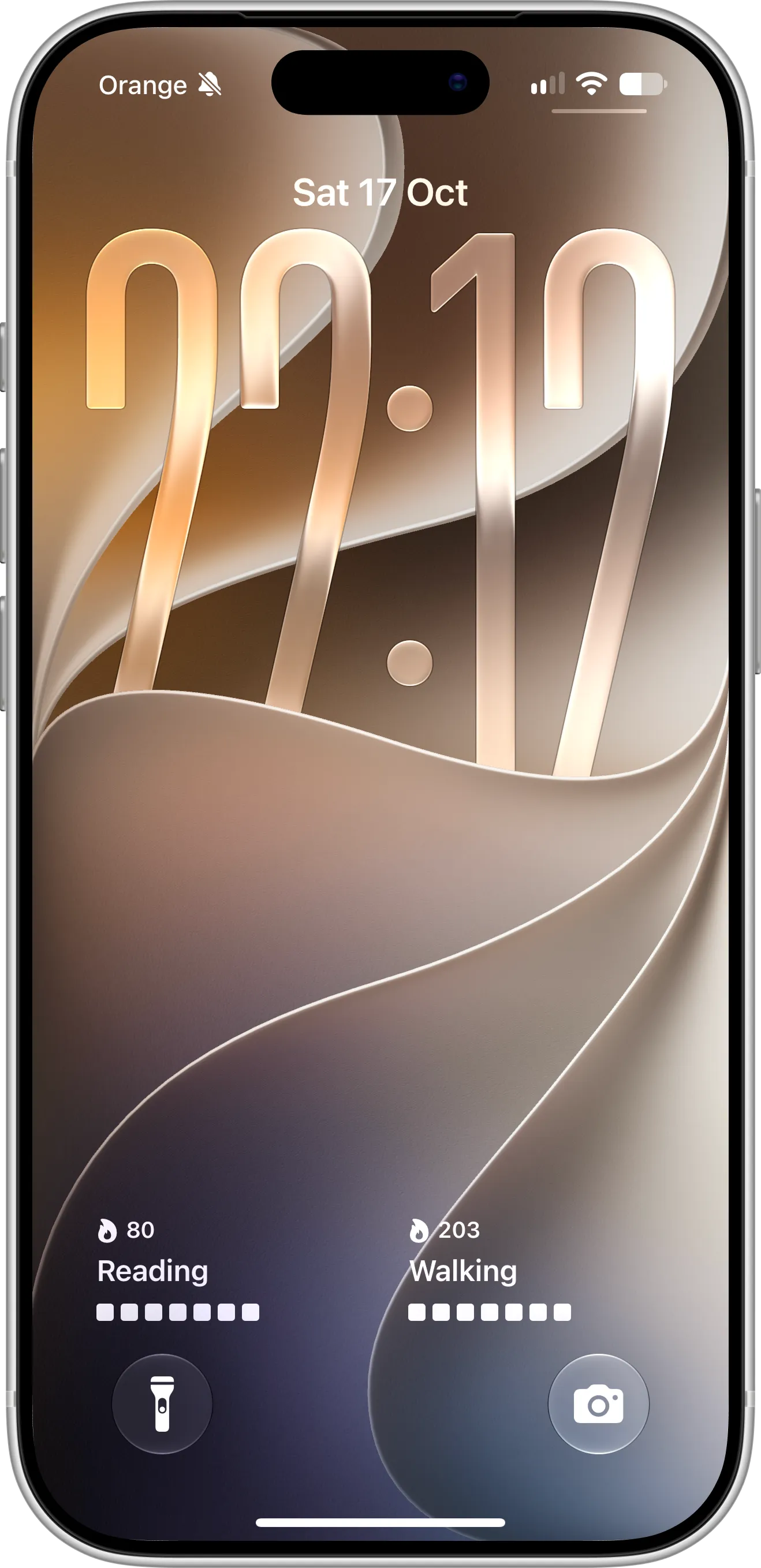
Two Completer Lock Screen widgets, Reading and Walking, each with the habit’s name, its current streak and the last seven days. Widgets are included in the free version.
When you want to dig deeper, Completer Pro adds charts by weekday, month and year, your top habits and a per-habit comparison — handy for spotting, say, that your workouts always slip on Thursdays.
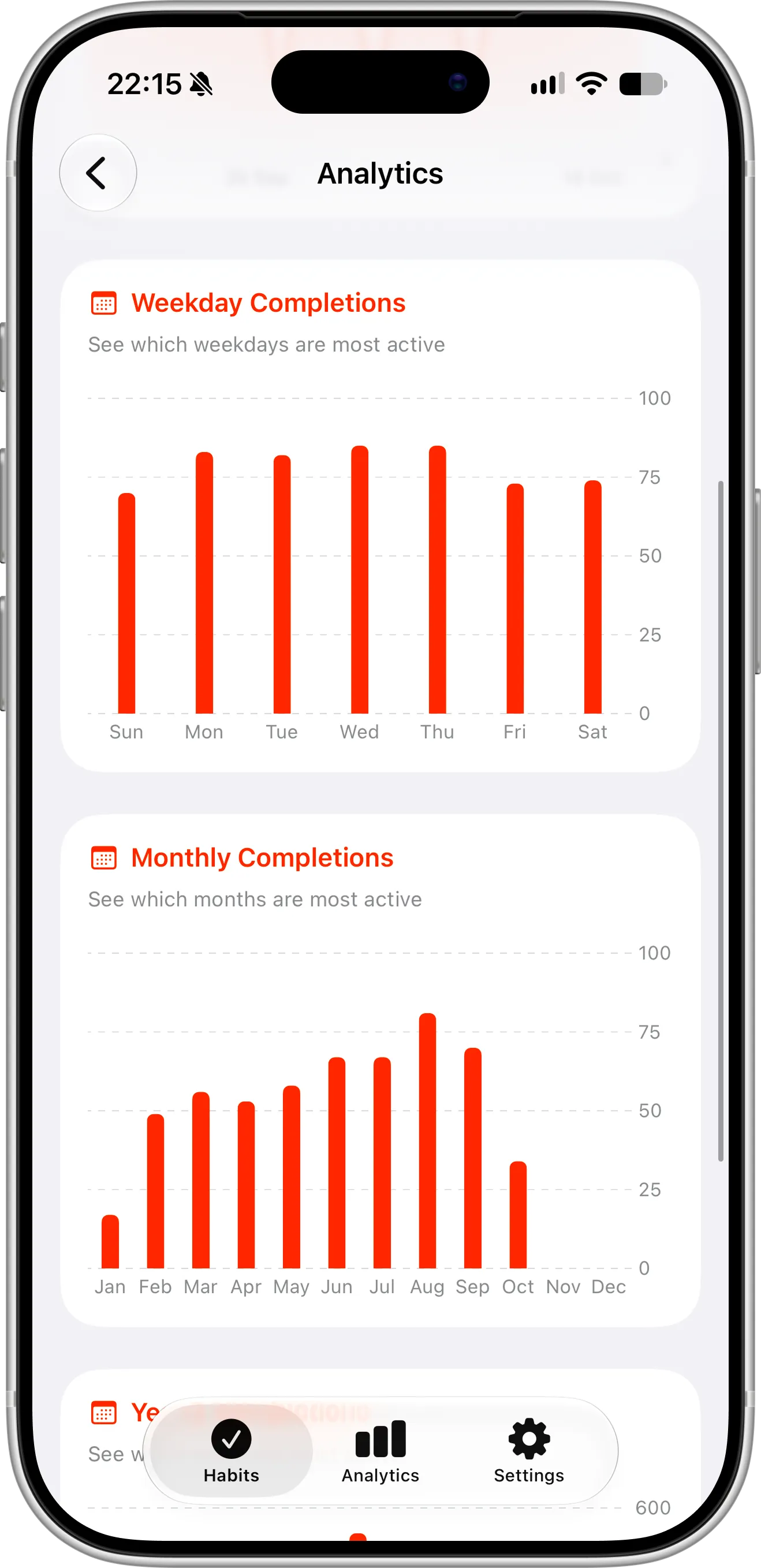
Completer Pro analytics: completions by weekday and by month show which days you’re most consistent and which months your habits tend to slip.
When Grit Is the Better Choice
Grit does a lot that Completer doesn’t, and for some people that’s exactly the point. Grit is probably the better fit if:
- You use an Apple Watch, Mac or Vision Pro. Grit runs on all of them. Completer is available for iPhone and iPad only.
- You track time or amounts. Grit has count and duration habits and a built-in timer with interval alerts and auto-stop. In Completer, you can write an amount like “30 pages” or “20 minutes” in a completion’s note, but it’s saved as text, not measured.
- You want habits to log themselves. Grit connects to Apple Health and can update habits from your health data. Completer doesn’t read Apple Health — you log habits yourself.
- You need a push to put your phone down. Grit can block selected apps until you’ve completed a habit and can ring a full-screen alarm. Completer only sends reminders.
- Badges and friends keep you going. Grit has achievements and lets you share habits with friends. Completer has no social features or rewards.
- You have a lot of habits to organize. Habit groups, search and filters make a long list in Grit easier to manage.
Which One Should You Pick?
Stay with Grit if you use its timers, Apple Health sync, Apple Watch app or app blocking — Completer won’t replace those.
Try Completer if you mostly open your habit app to check things off, want to see clear progress on the free version, prefer a lower price and a backup you can restore, and like seeing your habits by name on the Lock Screen.
Both apps are free to download, so the easiest test is to run them side by side for a couple of weeks and keep the one you actually open.
How to Move From Grit to Completer
There’s no direct import from Grit, but setting up Completer takes a few minutes:
- Install Completer and add up to three habits for free, each with a daily, weekly or monthly goal.
- Fill in your recent history — long-press the Complete button to log past days, or add a whole date range at once — so your streaks carry over.
- Add a Home Screen widget or a Lock Screen widget for the habit you care about most.
- Set reminders for the habits that tend to slip, or one general reminder for all of them.
Setting up habit tracking for the first time? Our 7-step guide to tracking habits on iOS covers it in more detail.
FAQ
Is Grit free?
Grit is free to download and lets you track up to three habits without paying. Unlimited habits and detailed statistics need Grit Premium, which costs $2.99 a month, $29.99 a year or $44.99 once for Lifetime in the US.
Is there a free alternative to Grit?
Completer is free for up to three habits, with no ads and no time limit. The free version includes progress grids, streaks, reminders, Home Screen and Lock Screen widgets and iCloud sync. Completer Pro adds unlimited habits and advanced analytics for $2.99 a month, $19.99 a year or $39.99 once in the US.
Does Completer have a timer or Apple Health integration like Grit?
No. Completer doesn’t have a built-in timer and doesn’t connect to Apple Health. If you rely on either, Grit is the better choice.
Does Completer have an Apple Watch or Mac app?
Not at the moment. Completer runs on iPhone and iPad and syncs between them through iCloud.
Do I need an account to use Completer?
No. Like Grit, Completer has nothing to sign up for — it uses your iCloud account to sync habits in the background.
I keep giving up on habit apps. What helps?
Fewer habits and a simpler setup usually help more than extra features. We collected some practical ideas in 7 proven ways to stay consistent with your habits.
Final Thoughts
Grit is an impressive, well-rated app, and if you use its timers, Apple Health sync or Apple Watch app, it’s hard to replace. But if you just want to see how your habits are going — clearly, simply and for less — Completer is a calmer Grit alternative for iPhone, and the free version is enough to find out if it’s right for you.